
Living in the Oceanside region, from the quiet, tree-lined neighborhoods of Qualicum Beach to the busy commercial districts of Nanaimo, residents prioritize safety and security. We typically lock our doors at night, participate in Block Watch programs, and when it comes to the digital world, we implement antivirus software to ensure we are protected from the scams, malware, and data breaches we hear about so frequently in the news.
At first glance, it is a logical instinct: If one security lock is good, two must be better. If one alarm system offers protection, surely a second one provides an additional assurance of safety.
However, in the world of computers, this logic does not hold up.

I witness the fallout of this misconception regularly when visiting residents in the Parksville area and Nanaimo. A client will contact me concerned that their relatively new computer is “painfully slow,” “buffering constantly,” or freezing during simple tasks. Upon inspecting their desktop, I often find a paid subscription to Norton 360 running simultaneously with a free version of Avast, and perhaps a dormant, expired McAfee trial that came pre-installed with the machine.
While the intention behind installing these programs is responsible diligence, the result is counterproductive. Running multiple antivirus software programs is not “extra protection”; it is arguably the single most detrimental thing you can do for your computer’s performance.
Instead of creating a fortress, you create a digital deadlock—a traffic jam that can make a modern laptop perform like a relic from 2010. In this comprehensive guide, we will analyze why this software conflict occurs, why “more” is not synonymous with “better,” and what residents of Parksville and the area should actually use to stay safe online.
“Too Many Cooks”: The Duplicate Antivirus Software Issue
To understand why “stacking” security software is never a good idea, it is essential to understand how antivirus software operates at a fundamental level.
Standard software, like your web browser (Chrome, Edge) or a document processor (Word, Adobe Acrobat Reader), runs on the “surface” of your operating system. If you open a PDF and Word at the same time, they largely ignore each other.
Antivirus software is different. It requires deep-level access to the “kernel”—the central core of your computer’s operating system. It demands special administrative permissions to intercept every file you open, every family photo you save, every email you receive, and every website you visit. It is designed to be the “General” of your computer’s defense.
When you install two of these programs, you are effectively appointing two Generals to command the same army, giving them conflicting orders at the exact same time. They do not collaborate; they fight for dominance over your system resources.
1. The “Oceanside Crawl” (Performance Hits)
We often joke about “Island Time” regarding the relaxed pace of life in our region, but your technology should not operate on this schedule.
Modern security suites utilize a feature called “Real-Time Scanning.” This means that the moment you click a file to open it, the antivirus intercepts that request, scans the file code for malicious patterns, and then allows it to open. This happens in milliseconds.
However, when two antivirus software engines are active:
- The Conflict: You click a file. Antivirus A intercepts it to scan. Antivirus B sees Antivirus A touching the file, interprets that action as suspicious “hijacking,” and attempts to intercept Antivirus A.
- The Result: You double (or triple) the workload on your processor and hard drive.
- The Symptom: You click to open your web browser to check the weather or local news, and the little spinning wheel sits there for 10, 20, or 30 seconds (buffering). Your computer isn’t broken; it is simply overwhelmed by its own security.

2. The False Alarm Loop
Antivirus software is designed to hunt for programs that behaves like a virus. A virus typically attempts to monitor your keystrokes, hide deep in system files, and modify other programs.
Ironically, this is exactly what antivirus software does.
Because Antivirus A behaves like a virus (watching your system), Antivirus B will often identify it as a threat.
- The Symptom: You receive constant, confusing pop-ups warning you about “suspicious activity” or “unauthorized access.” In reality, this is just Norton fighting with McAfee.
- The Danger: This leads to “Warning Fatigue.” When users are bombarded with false alarms, they stop reading them. Eventually, a real threat may appear, and the user will instinctively click “Allow” just to make the box go away.
3. The System Crash and “Blue Screen”
In severe cases, the conflict creates a critical error in the Windows operating system. If both programs attempt to lock the same system file simultaneously—often during a Windows Update—the computer enters a fail-safe mode to prevent data corruption.
- The Symptom: The computer freezes completely, requiring a hard reboot, or displays the dreaded “Blue Screen of Death” (BSOD). This is a major hassle if it occurs while you are filing taxes, paying bills, or on a video call with family.
Why Does Anti-Virus Duplication Happen?
In my experience helping clients in the Parksville/Qualicum Beach region, the duplication of software is almost always accidental, stemming from aggressive marketing tactics by software companies. It usually happens in one of three ways:
1. The “Bloatware” or Pre-Installed Trap
This is the most common culprit. You purchase a new laptop at a box store in Nanaimo. The manufacturer (HP, Dell, Lenovo) has been paid to pre-install a 30-day trial of McAfee or Norton. You, having a personal preference or a subscription elsewhere, install your preferred software immediately.
- The Mistake: Most users assume the new software will overwrite the old one. It does not. Unless you manually uninstall the trial version first, both will run simultaneously.
2. The “Free Download” Panic
You are browsing the web when a worrying pop-up appears claiming: “Your computer is infected! Click here to scan!” These are often advertisements, not system messages. Out of concern, you click the link and download a free antivirus software program (like AVG or Avast). Now, you have your original paid protection fighting with this new, panic-downloaded software.
3. The “Expired” Zombie
This scenario is prevalent among members of our community. You may have had a paid subscription that expired several years ago. You decided not to renew it, perhaps switching to a different provider or assuming Windows Defender was sufficient.
- The Reality: Stopping payment does not remove the software. The program remains on your hard drive. It stops updating its virus definitions (making it useless against new threats), but the program itself continues running in the background, consuming memory and nagging you for credit card details. It is a “zombie” program—dead, but still eating your system resources.
What You Should Use Instead (The “One Guard” Rule)
The Golden Rule of computer hygiene is simple: You only need one solid antivirus software solution.
For most home users in the Oceanside region, there are two valid paths to take.
Option A: Windows Defender (The Built-In Choice)
Years ago, the built-in security in Windows was lackluster. That has changed. If you are running Windows 11, you already have a world-class security suite on your computer, called Microsoft Defender.
- Pros: It is free, it is integrated into the operating system (meaning it won’t slow you down), and it updates automatically with your Windows Updates.
- Cons: It is a “silent” protector. It does not come with a help desk. If you do manage to get infected, there is no phone number to call for help. (You can call or text us for help anytime: 1-250-228-6520.)
Option B: Managed Antivirus Software (The “Peace of Mind” Choice)
If you desire extra protection or feel concerned about high-level phishing scams targeting our 55+ community demographic, you may prefer a paid solution.
- The Secret: Avoid buying “off the shelf” software from big box stores. These consumer-grade products are often designed to act like billboards, constantly popping up with upsells for “Driver Updaters” or “VPN Services.”
- The Solution: Look for Managed Antivirus Software from a local provider such as ParksvilleTech. This is commercial-grade software that reports back to a technician. If a virus is detected, we see the alert on our dashboard and can often neutralize it remotely – no need for worry or intervention! This solution offers the security of paid software without the annoyance of marketing pop-ups.
A Critical Distinction: Antivirus vs. Anti-Fraud
While we are discussing security, it is vital to make a distinction that is crucial for residents from Bowser to Nanaimo. No antivirus software can stop a phone scam.
We see a disproportionately high volume of fraud targeting senior residents in the Parksville/Qualicum Beach region. Criminals know the demographics here and target landlines with aggressive social engineering tactics.
If someone calls you claiming to be from “Microsoft,” “Amazon,” “Shaw/Rogers,” or “The CRA,” and asks you to download software to “fix” your computer: Hang up immediately.
- The Reality: Antivirus software protects you from files (malicious code). It cannot protect you from a person on the phone convincing you to hand over your credit card, buy Google Play gift cards, or grant them remote access to your banking.
- The Advice: Technology is a tool, but your intuition is the defense. Microsoft will never call you to tell you your computer is infected.
How to Fix Your Computer Today
If you are reading this and realizing, “Uh oh, I think I might have Norton and McAfee,” do not worry. This is a fixable problem.
Here is the step-by-step process for cleaning up your system:
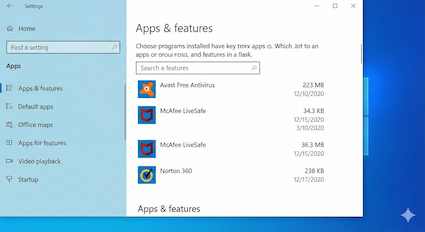
- Check Your List: Click your Start Menu and type “Installed Apps” or go to Settings > Apps > Installed Apps.
- Review the List: Scroll through and look for security names. Common ones include Norton, McAfee, AVG, Avast, Kaspersky, Trend Micro, and Webroot.
- The Purge: Choose ONE to keep (or choose none, if you plan to use the built-in Windows Defender). Click the three dots next to the antivirus programs you want to remove and select Uninstall. Remember, while it’s important to stay protected, Microsoft’s official support guidelines suggest that having more than one antivirus program active at a time can cause your Microsoft operating system to behave unexpectedly.
- Restart: This is critical. You must reboot your computer to clear the old files from the memory kernel.
You might be shocked at how much faster your computer runs once you remove this “digital dead weight.”
Still Feeling Unsure?
Technology can be intimidating, and the fear of deleting the “wrong thing” is real. If you are nervous about performing these steps yourself, or if you have removed problematic antivirus software and your computer is still sluggish, do not struggle alone.
At ParksvilleTech, we specialize in helping individuals with computer repairs. We can perform a professional cleanup, ensure your “One Guard” is active and up-to-date, and verify that your desktop computer or laptop, other electronic devices, and home network is free of hidden malware.
A fast, safe computer is not a luxury; it is a necessity for staying connected. Let’s make sure yours is running at its best.