
From the sandy beaches of Parksville to the quiet charm of Qualicum Beach, our region is a paradise for living and doing business. We enjoy a lifestyle that is the envy of the country, blending a relaxed pace with a vibrant local economy. But even here on Vancouver Island, we are not immune to the digital storms brewing globally.
For local small business owners—whether you run a seasonal resort, a boutique retail shop on Old Island Highway, or a professional service firm in an industrial park—IT risk management often takes a back seat. It is easy to let cybersecurity slide when you are consumed by the daily grind of serving customers, managing staff, and keeping the books balanced.
However, the reality of modern business is that “small” does not mean “safe.” A single data breach, a ransomware attack, or even a day of downtime during the peak tourist season can be devastating. As a local tech support provider, we see firsthand how cyber threats affect our neighbors, such as ensuing panic when a business owner realizes their client database is encrypted. While we’re here to help you navigate the long road to recovery, we’d rather see you avoid that outcome altogether.
This article is designed to turn “enterprise-grade” risk management concepts into manageable bites (or bytes?). We are stripping away the jargon and tailoring these concepts specifically for the Qualicum Beach to Nanaimo small business community. Our goal is to help you move from a place of uncertainty to a place of confidence, ensuring your business is resilient enough to weather any digital storm.
Defining Risk in the “Oceanside” Region
Before we dive into technical solutions, we must define what “risk” actually looks like in the context of our local economy. In the corporate boardrooms of Vancouver or Toronto, risk management is often relegated to an abstract figure on a spreadsheet. However, for a Parksville entrepreneur, risk is personal.
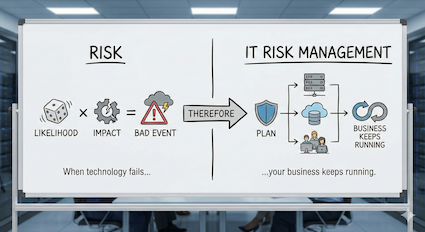
Risk is simply the likelihood of a bad event happening multiplied by the impact it would have on your operations. IT Risk Management, therefore, is the plan you have in place to ensure that when technology fails—and eventually it will—your business keeps running.
On Vancouver Island, IT risk management takes on a unique and local flavor:
- The “Summer Rush” Risk: Many local businesses generate 60% to 80% of their annual revenue between May and September. If your Point of Sale (POS) system fails on a long weekend in July, you aren’t just losing three days of sales; you are losing a significant chunk of your annual profit margin.
- The “Remote Work” Risk: The “Oceanside” lifestyle attracts many remote workers and digital nomads. If an employee is working from a coffee shop in Qualicum Beach and connects to unsecured public Wi-Fi to access your server, they may inadvertently open a backdoor for hackers.
- The “Island Supply Chain” Risk: If a critical server blows a motherboard in downtown Vancouver, a replacement might be an hour away. Here in Parksville, hardware failure often means waiting days for replacement parts to arrive from the mainland. That delay is a risk factor that must be accounted for.
The Risk Management Assessment Process: Know Your Assets
You cannot protect what you don’t know you have. Effective risk management begins with a comprehensive Risk Assessment. This isn’t about buying software yet; it is about taking an inventory of your digital life.
1. Identify Your Assets
What is critical to your daily operations? If you walked into your office tomorrow and everything was gone, what would you miss most?
- Tangible Assets: These are the physical tools of your trade. It includes your servers, workstations, laptops, tablets, and POS terminals. But don’t forget the infrastructure—your modems, routers, and the backup drives you store securely.
- Intangible Assets: These are often worth far more than the hardware. This includes your customer data, booking information, credit card details, and proprietary client lists.
- Reputation: In a tight-knit community like Parksville and Qualicum Beach, your reputation is your most valuable currency. If you are a local accountant or lawyer and you lose client data to a breach, the damage to your trust within the community can be terminal.
2. Identify the Threats
What could harm these assets? While we face the same global threats as everyone else, we also face specific regional challenges.
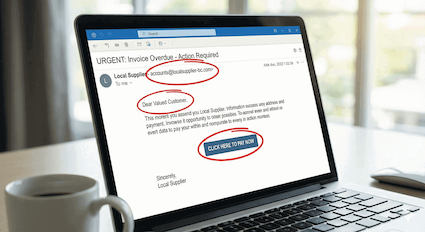
- Phishing & Social Engineering: This is the most common entry point for cyberattacks. Scammers send fake emails pretending to be local suppliers, the CRA, or well known companies like Microsoft support. They often target busy administrative staff or seasonal workers who may be rushing to complete tasks.
- Ransomware: This is a nightmare scenario. Ransomware is automated software that breaks into your system, encrypts your files, and demands a fee (often thousands of dollars in cryptocurrency) to unlock them. Small businesses are frequent targets because hackers know they often lack dedicated IT security teams.
- Physical Environmental Threats: We live in a rainforest. Salt air corrosion can shorten the lifespan of electronics, and winter storms frequently knock out power across the Regional District of Nanaimo (RDN). A sudden power surge when the grid comes back online can fry expensive hardware instantly.
3. Assess Vulnerability & Impact
Once you know the threats, ask yourself: If this happened, how bad would it be for my business?
- High Impact: A resort losing its entire reservation database in mid-July. This is a “business-ending” event.
- Medium Impact: A ransomware virus locking up your accounting files two weeks after tax season. It is painful and expensive, but survivable with backups.
- Low Impact: A 10-minute internet outage on a rainy Tuesday in November. It is an annoyance, but not a disaster.
Calculating Risk: The Mathematics of Disaster
How do you decide where to spend your limited IT budget? Should you buy a new server, improved antivirus, or a backup generator? You don’t need a degree in actuarial science to figure this out. Use this simple business formula to prioritize:
Threat × Vulnerability × Cost of Downtime = Risk Score
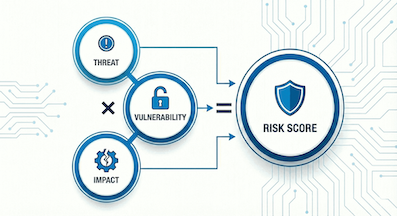
Let’s look at a hypothetical example: The Case of the Winter Storm.
- The Threat: A severe winter storm knocks out power for 48 hours.
- The Vulnerability: Your server is 7 years old and is not plugged into an Uninterruptible Power Supply (UPS) or generator.
- The Cost: You cannot process orders or access client files for two days. If your business makes $2,000 a day, the direct cost is $4,000. If the power surge corrupts your hard drive, the recovery cost could be another $5,000.
- The Result: A potential $9,000 loss from a highly probable event.
The Fix: A high-quality UPS battery backup might cost $300. When you compare the $300 cost to the $9,000 risk, the decision becomes obvious. This is the power of a risk management calculation—it turns fear into financial logic.
Implementing Strategies: The “Parksville Tech Defense” Approach
Once you have your calculated risk score, you generally have five strategic risk management options to handle them. We call this the “Parksville Tech Defense” approach to IT security and risk management.
1. Avoidance
Sometimes the best way to handle a risk is to eliminate the activity that causes it.
- Local Example: If you are a small retail shop, do you really need to store customer credit card numbers on your computer? If you don’t store them, hackers can’t steal them from you. By switching to a payment processor that handles the data off-site, you avoid the risk entirely.
- Action Item: Prohibit employees from using local computer drives to store payment details is risk management through avoidance.
2. Reduction
This is where most cybersecurity tools live. You acknowledge the risk exists, but you take steps to lower the likelihood of it happening.
- Local Example: You know phishing emails are a threat. To reduce the risk, you install a robust firewall, deploy advanced antivirus software, and enable Multi-Factor Authentication (MFA) on all email accounts.
- Action Item: Training your staff can be an effective reduction strategy in IT risk management. Reducing the human error factor is your single best defense. When identifying threats, it is helpful to consult the official cyber threat guidance for Canadian small businesses to see what is currently trending.
3. Spread (Redundancy)
Don’t put all your eggs in one basket. If one system fails, you need a backup plan ready to go.
- Local Example: Reliance on a single internet provider can be risky on Vancouver Island. Some businesses install a secondary LTE/5G backup connection so that if the main line goes down, their debit terminals keep working.
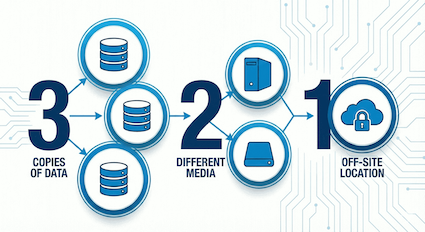
- The Golden Rule: Use the 3-2-1 Backup Rule. Keep 3 copies of your data, on 2 different types of media (e.g., your computer and an external drive), with 1 copy stored off-site (e.g., in the cloud). If a fire destroys your office, that off-site copy is your lifeline.
4. Transfer
Sometimes the risk is too big for you to handle alone. In these cases, you shift the financial burden to a third party.
- Local Example: Purchasing Cyber Liability Insurance. If you are breached, the insurance covers the cost of forensic investigations, legal fees, and notifying customers.
- Important Note: Most insurance providers now require proof of managed IT security (like active monitoring and MFA) before they will issue a policy. You cannot transfer the risk if you are negligent!
5. Retention
Finally, there are some risks you just have to live with.
- Local Example: You might decide that the cost of a full backup generator is too high for your small office. You choose to retain the risk that you might be closed for a few hours during a storm.
- Action Item: Create an “IT Emergency Fund.” Set aside a small budget annually to cover unexpected hardware failures so they don’t hurt your cash flow.
The “Human Firewall”: Addressing the Seasonal Staff Challenge
One specific challenge for Oceanside and RDN businesses is our reliance on seasonal staffing. Every summer, thousands of students and temporary workers join our local workforce to handle the tourism influx.
While these employees are vital to our economy, they can represent a significant cybersecurity risk. A summer student working the front desk for eight weeks may not have the same level of security awareness as a long-term employee. They may casually click a link in an email that looks like a supplier invoice, inadvertently launching a ransomware attack.
Best Practices for Seasonal Teams:
- Onboarding: Make cybersecurity part of the first day of orientation. Spend 15 minutes explaining why they shouldn’t share passwords or click unknown links.
- Least Privilege: Limit access. Does the summer intern really need administrator access to your entire server? Give them access only to the files they need to do their job.
- Exit Procedures: When the season ends in September, ensure you immediately disable their accounts and change shared passwords. Breaches frequently occur because an old account from three summers ago was left active and unguarded.
A Proactive Future: Partnering Locally
Risk management is the shield that protects your organization’s future. It sounds daunting, but it is actually a liberating process. Once you have identified your risks and put a plan in place, you stop worrying about the “what ifs” and instead focus on growing your business.
However, you don’t have to navigate these waters alone. The complexity of modern cyber threats means that IT is no longer a DIY project for most business owners.
Partnering with a local Managed IT Services provider offers distinct advantages. A local team understands the specific needs and constraints of the Vancouver Island economy. We know that if your internet goes down on a Friday afternoon in August, it’s an emergency. We understand the local supply chain issues and how to mitigate them. Parksville Tech can act as your outsourced IT department, monitoring your systems 24/7 to catch threats before they become disasters.
Conclusion: Don’t Wait for the Storm
Cybersecurity is not a product you buy once and forget; it is a continuous process. The threats evolve, and so must your defenses. By assessing your risks today with effective IT risk management processes, you ensure your Oceanside business is here tomorrow.
Whether you are running a construction firm in Parksville’s industrial park, a real estate agency in Qualicum Beach, or a service business in downtown Nanaimo, your data is your lifeblood. Let us help you protect it with the same care you protect your physical premises, by implementing vital risk management strategies.

Ready to secure your business? Don’t wait for a crisis. Contact us today for a free IT Risk Management Assessment. Let’s review your current vulnerabilities, calculate your risk score, and build a strategy that ensures your technology works for you, not against you. Together, we can keep the Oceanside and Nanaimo business community safe, secure, and thriving!